



AI Security · Governance · MLOps
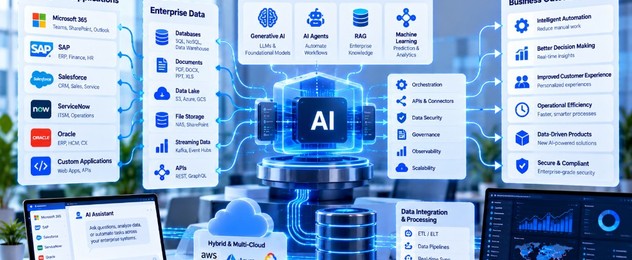
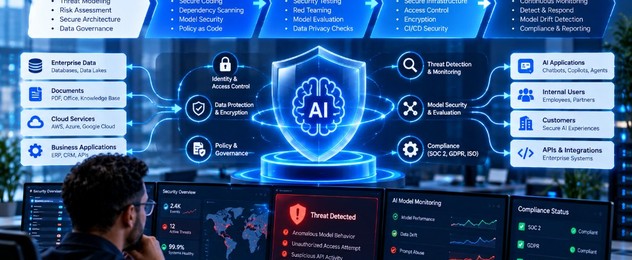
Security for an AI system is not a review that happens after the model is chosen. The model, the data it sees, the prompts that steer it, the tools it can call, and the service that hosts it are one system. A weakness in any of those parts becomes an answer, an action, or a leak.
Secure the decision to build
Before design, name the harm if the system is wrong or abused. A drafting assistant for internal procedures is not the same risk as a system that can change a customer record or recommend a credit decision. Write down:
- What data it will read, and which of that data is sensitive.
- What actions it can take, if any.
- Who is allowed to use it.
- What a person must still approve.
- How a bad outcome would be detected and reversed.
If those answers are unknown, the project is not ready for a model. It is ready for a scope conversation.
Protect the data path
Training sets, evaluation sets, document indexes, and prompt logs all hold company information. They need the same controls as the systems they came from: access limited to the people who operate the service, encryption in transit and at rest, and a retention rule. Prompt logs are especially easy to forget. They often contain the customer text, the retrieved documents, and the answer.
Do not send data to a model provider that the contract and the data classification do not allow. Enterprise agreements, regional processing, and a ban on using customer content to train someone else’s model should be checked before the first API call, not after a pilot has already copied a folder.
Constrain prompts, tools, and retrieved text
Users and documents can both try to redirect the system. A user may ask it to ignore policy. A retrieved page may contain hidden instructions. The design response is to keep system instructions separate from user and document text, to refuse requests outside the job, and to withhold tools that are not required for that job.
An assistant that can only read and draft has a smaller blast radius than an assistant that can call internal APIs. Add tools one at a time, each with its own authorization check and an audit record.
Test for abuse before release
Functional tests ask whether the happy path works. Security tests ask whether the system stays inside its job when someone tries to pull it out. Build a set of cases the system must refuse or must keep inside the user’s permissions: requests for other customers’ data, requests to reveal hidden instructions, requests to take an action the user cannot take, and documents that contain misleading directions.
Run that set on every prompt and model change. A “more helpful” prompt is a common way to weaken a refusal that was working last month.
Deploy it as a governed service
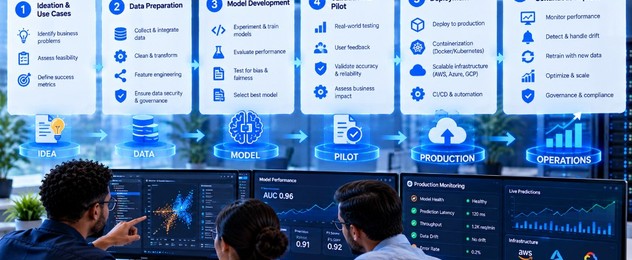
The runtime needs an identity, a network boundary, secrets that are not sitting in a notebook, and logs that security can search. Record the user, the time, the model version, the tools called, and whether an action was committed. Without that record, an incident becomes a debate about what the system might have done.
Give the service an owner who can disable it. A kill switch that requires a release cycle is not a kill switch.
Watch it after launch
Monitor for spikes in refusals, unusual tool use, answers that cite nothing, cost anomalies, and reports from users that an answer disclosed something it should not. Review a sample of logs on a schedule proportional to the risk. High-impact workflows need a human look. Low-impact drafts need a lighter check, not none.
When the model provider ships a new version, treat it as a change. Re-run evaluation and the abuse set before it becomes the default.
Give governance a small surface
Governance fails when it is a committee with no artifact. Keep one page per system: purpose, data, actions, owner, evaluation results, open risks, and the date of the last review. Update it when the scope changes. That page is what audit, security, and the business owner should be able to read in one sitting.
How Neural Xpert helps
Neural Xpert builds AI security into the system from design through production: data boundaries, tool permissions, evaluation, logging, and the operating model that keeps the control intact after launch. The goal is an AI service the security team can reason about, not a pilot that bypassed them.